
SMS API for developers
Connect your e-shop, CRM or booking system with a simple JSON API over HTTPS. You send SMS with one call and find out whether they were delivered without setting up a webhook, without a public URL and without a static IP. If you prefer, there is also an SMPP connection on request (see below).
Create an account · Full documentation
Get started in three steps
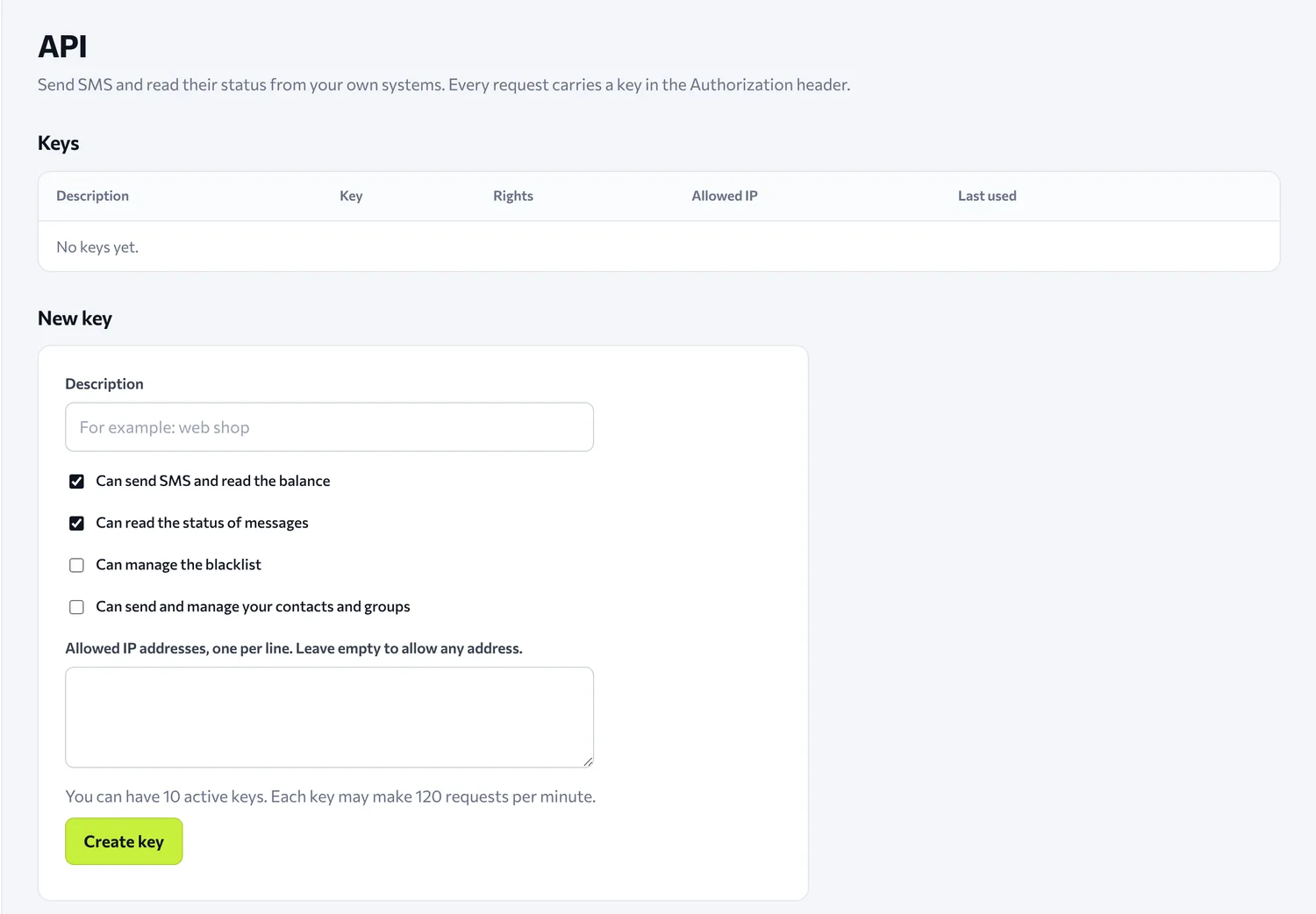
- Create an account and open the API page of the panel. Create a key. It is shown only once, so save it right away.
- Send an SMS with the call that follows.
- Read the delivery reports from
/v1/reports.
curl -X POST https://api.isms.gr/v1/messages \
  -H "Authorization: Bearer YOUR_KEY" \
  -H "Content-Type: application/json" \
  -d '{"sender": "MyShop", "to": ["306900000000"], "text": "Your order is on its way", "client_ref": "order-1042"}'
Prefer SMPP?
Besides the JSON API, you can also send through SMPP, if your system (for example a messaging platform or a gateway) speaks that protocol. Access is opened on request: contact us and we will activate it for your account.
- The connection is encrypted (TLS only) and is made only from the IP addresses you give us.
- The SMPP password is at most 8 characters, a limit of the protocol itself, and it is separate from your panel password.
- Messages are charged from the same balance and appear in your history with SMPP as the source.
- The same rules apply as in the panel and the HTTP API: the blacklist and the spam filter.
See also the FAQ for when SMPP is worth it and when the HTTP API is.
Authentication and rights
Every request sends the key in the header Authorization: Bearer <key>. All requests are made over HTTPS.
Each key has only the rights you gave it:
| Right | What it allows |
|---|---|
send |
Sending SMS (also to a group) and reading the balance |
read |
Message status and delivery reports |
blacklist |
Viewing and changing the blacklist (off by default) |
contacts |
Contacts and groups: create, update, view, delete (off by default) |
This way you give each system only what it needs, for example a reporting tool only read. You can optionally limit a key to specific IPs, but it is not required. A key is revoked immediately from the panel and from that moment answers 401. You can have up to 10 active keys.
Sending: POST /v1/messages
| Field | Required | What it is |
|---|---|---|
sender |
yes | Sender name, up to 11 Latin characters, digits or dots, or up to 15 digits. It must be approved on your account. |
to |
yes, unless you send group |
A list of mobile numbers with country code, for example 306900000000. Up to 1,000 per call. |
group |
yes, unless you send to |
The name of a contact group (upper or lower case does not matter). You send either to or group, not both. |
text |
yes | The message. |
unicode |
no | true for Unicode (70 characters per part). Default is GSM (160 characters). |
schedule_at |
no | Send time, ISO 8601. |
client_ref |
no | Your own reference, 1 to 64 characters. See below. |
If a number is invalid or has no country code, the whole request is rejected and nothing is sent or charged. You are charged when the message is accepted, from your account balance.
Example response:
{
  "id": "KN-7K3M9-Q2XPD",
  "client_ref": "order-1042",
  "status": "queued",
  "created_at": "2026-10-12T08:20:30Z",
  "scheduled_at": null,
  "cost": "0.03572",
  "recipients": 1,
  "counts": {"queued": 1, "sent": 0, "delivered": 0, "failed": 0, "unknown": 0, "blocked": 0},
  "duplicate": false
}
Money is always returned as a string, in euros, and times are in UTC.
Safe retries with client_ref
If a request times out and you don't know whether it arrived, send it again with the same client_ref. A second SMS is not sent and you are not charged again: you get the original message back with "duplicate": true. We remember the client_ref forever.
Delivery reports without a webhook
You ask, and we give you only what you haven't already received. That's why you need no public URL and no static IP.
curl "https://api.isms.gr/v1/reports?limit=500" \
  -H "Authorization: Bearer YOUR_KEY"
{
  "reports": [
    {"message_id": "KN-7K3M9-Q2XPD", "client_ref": "order-1042", "mobile": "306900000000",
     "status": "delivered", "reason": null, "at": "2026-10-12T08:20:36Z"}
  ],
  "count": 1,
  "ack": "tVEgYU10LopOB6biUNbftQ",
  "next_poll_after": 5
}
How the cycle works:
- The call returns a batch of reports and an
ack. - After you have stored the batch, you call again with
?ack=<the ack>. This confirms it and brings the next one. - If your system crashed before storing, you don't send the
ackand you get the same batch again. Nothing is lost. - When there is nothing new, the list is empty and
next_poll_aftertells you in how many seconds to ask again.
Each SMS gives one report with its final status, not three intermediate ones. If you don't confirm a batch, you receive it again, so store by message_id and mobile so that a duplicate doesn't confuse you. Reports you have confirmed are kept for 30 days. It needs the read right.
Recipient statuses
| Status | What it means |
|---|---|
queued |
Accepted, not yet given to the provider. |
sent |
Given to the provider, no final result yet. Don't send it again, it may already have been delivered. |
delivered |
Final. The phone received it. |
failed |
Final. Not delivered. reason says why. |
blocked |
Final. The number was on your blacklist at the moment it was due to be sent. |
unknown |
Final. No result arrived within 72 hours. It may or may not have been delivered. |
For each message separately, you can ask GET /v1/messages/{id} or GET /v1/messages?client_ref=....
Contacts and groups
If you keep your customers in your own CRM, you can sync them with the panel and send to a group with a single call. It needs the contacts right.
curl -X PUT https://api.isms.gr/v1/contacts \
  -H "Authorization: Bearer YOUR_KEY" \
  -H "Content-Type: application/json" \
  -d '{"contacts": [{"mobile": "306900000000", "name": "Maria", "groups": ["Newsletter"]}]}'
- Each contact has a required
mobile(with country code) and optionallyname,surname(up to 100 characters),fields(the contact's fields) andgroups. A group that doesn't exist is created. - Up to 1,000 contacts per call. Contacts that are rejected are returned with the reason, and the rest are saved normally.
- With
"replace_groups": true, each group named in the request contains exactly the contacts you sent. Those who left the group stay as contacts. Here the request fails as a whole if even one contact is invalid (invalid_contacts), and nothing changes. - The fields your account accepts are listed by
GET /v1/contact-fields. The list can change, so read it instead of keeping it fixed. - Account limit: 100,000 contacts and 500 groups.
For each new contact, or contact added to a group, the panel records that your account declared consent through the API (date, key and group). Consent is your responsibility. Numbers on the blacklist are saved, but get no consent record and do not receive messages.
The other calls:
| Call | What it does |
|---|---|
GET /v1/contacts?mobile=... |
One contact. |
GET /v1/contacts |
List of contacts, 1,000 per page (page), optionally filtered by group. |
DELETE /v1/contacts/{mobile} |
Delete a contact. Blacklisted numbers are not deleted from here. |
GET /v1/groups |
The groups with their number of contacts. |
POST /v1/groups |
Create a group with {"name": "..."}. The name Blacklist is reserved. |
DELETE /v1/groups?name=... |
Delete a group. The contacts stay. |
DELETE /v1/groups/members?name=... |
Empty the group. The contacts stay. |
To send to a group, use the group field in POST /v1/messages.
The blacklist from your own system
Numbers on the blacklist do not receive messages and are not charged. The check applies the same way in the panel, the HTTP API and SMPP. When a customer replies STOP, you can add them automatically (blacklist right):
curl -X POST https://api.isms.gr/v1/blacklist \
  -H "Authorization: Bearer YOUR_KEY" \
  -H "Content-Type: application/json" \
  -d '{"to": ["306900000000", "306900000001"]}'
There are also GET /v1/blacklist (list, or check one number) and DELETE /v1/blacklist/{mobile}.
Balance
curl https://api.isms.gr/v1/credits -H "Authorization: Bearer YOUR_KEY"
{"credits": "12.34000", "currency": "EUR"}
Limits
- 120 requests per minute per key.
- Reports: at least 5 seconds between two calls.
- Status of one message: up to 10 queries per minute.
- Up to 1,000 numbers per send and up to 1 MB per request.
- If you exceed the limits you get 429 with
Retry-After. A key that keeps exceeding them is stopped for 15 minutes. If you followRetry-Afterandnext_poll_after, you will never see it.
Errors
Every error is JSON, with a stable code that does not change:
{"error": "insufficient_balance", "message": "..."}
| HTTP | Codes | What you do |
|---|---|---|
| 400 | invalid_json, invalid_request, invalid_sender, invalid_number, too_many_recipients, blocked, empty_group, group_too_large, too_many_contacts, invalid_contacts, invalid_group, contact_limit, group_limit |
Fix the request. blocked means the text was rejected by the spam filter. contact_limit and group_limit show that you reached the account limit. |
| 401 | unauthorized, invalid_key |
The key is missing, unknown or revoked. |
| 402 | insufficient_balance |
Your balance is not enough. Nothing was sent or charged. |
| 403 | forbidden, account_inactive, ip_not_allowed |
The key doesn't have the right, or the IP isn't allowed. |
| 404 | not_found, group_not_found |
The message or the group doesn't exist. |
| 409 | conflict |
Another request changed the same contacts or groups at the same moment. Send it again. |
| 413 | too_large |
The request exceeds 1 MB. |
| 429 | rate_limited, too_soon, too_many_requests_for_message, locked |
Wait as many seconds as Retry-After says. |
| 503 | no_provider |
We temporarily can't send. Nothing was charged. Try again with the same client_ref. |
The full documentation, with all the fields and ready-made code examples in cURL, Python, PHP, Node.js, Java and Go, is public: my.isms.gr/docs/api. For questions, contact us.